Unordered List

Showing posts with label Tips N Tricks. Show all posts

Tuesday, July 9, 2013

How To Add Images Directly into Facebook Comment Box

Now Facebook updated new feature to upload images directly to comment box. You can directly upload images from your computer to Facebook comment box. Later we does some trick to makeup an iname into comment box. Now Facebook officially give a way to  upload images in to comment box. Its very easy procedure. Just follow this post and enjoy with master hacks.

Choose the photo you want to add in comment from your desktop and press enter.(www.masterhacksindia.blogspot.com)


Log in your Facebook account .


  • Go to Home page.


  • Click on Camera button, you see on comment box.

How To Add Images Directly into Facebook Comment Box (www.masterhacksindia.blogspot.com)


  • Then select an image from you computer.


  • After complete uploading, Just hit Enter key.

Now Facebook updated new feature to upload images directly to comment box.(www.masterhacksindia.blogspot.com)


  • Now you will see images on comment box..


Leave a comment about this post….

Sunday, July 7, 2013

911 Attack on Notepad


                       image

      Now the World Trade Center attack can be seen on a simple Notepad file. Let’s begin this trick with the bit of information – The flight number of the respective flight that hits twin tower was Q339.  However,  new notepad versions change it recently. So you have to change 9 to N.


Let’s Try,

   1) Open a new notepad file.

   2) Type Q339        Write N instead of 9 in latest versions

                    image

                      image

3) Increase the font size to 72

4) Change the font type to “Wingdings”

Enable GodMode in Windows 8


There is a simple way to access a hidden "God Mode" in Windows 7,Vista and in 8.If you want to Enable GodMode in Windows . Just create a folder on the desktop and name it whatever you like. After that, select Rename. Now just add the following to the end of the folder name:

like:

    All Settings.{ED7BA470-8E54-465E-825C-99712043E01C}


                  image


When you do this, the icon on the folder changes into one that is exactly the same as the Control Panel.

                   image


However, if you click on the new GodMode icon, you’ll get a folder with a bunch of links to all kinds of settings on Windows 8. It’s nice because it even breaks it down by category.

  image

Load Your Menu Faster on windows(xp,vista,7,8)


Go to Start then Run

    image

Type 'Regedit' then click 'Ok'
Find "HKEY_CURRENT_USER\Control Panel\Desktop\"
Select "MenuShowDelay"

        image
Right click and select "Modify'
Reduce the number to around "100"

       image
This is the delay time before a menu is opened. You can set it to "0" but it can make windows really hard to use as menus will open if you just look at them - well move your mouse over them anyway.

Start your Windows 8 in Safe Mode with networking


Start Windows 8 in Safe Mode with networking
1. Press the Windows key    + C, and then click Settings.

             image

2. Click Power, hold down Shift on your keyboard and click Restart.

              image

3. Click Troubleshoot.

             image

4. Click Advanced options.

          image

5. Click Startup Settings.

          image

6. Click Restart.

            image


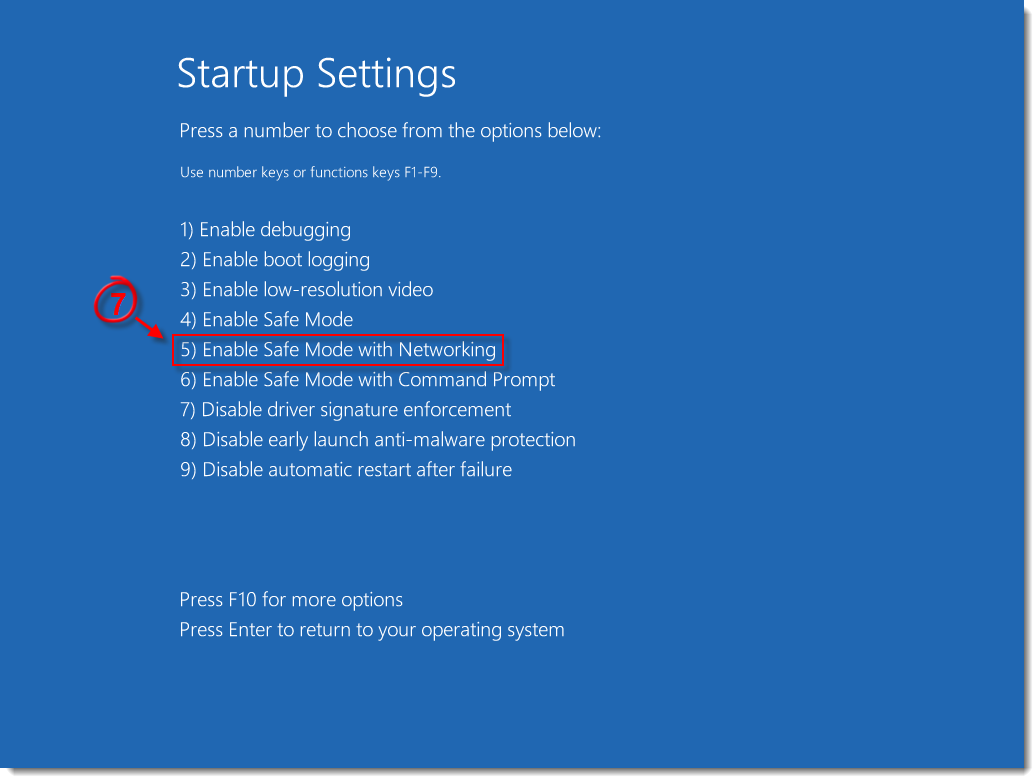
7. Press 5 on your keyboard to Enable Safe Mode with Networking. Windows will start in Safe Mode with Networking.  

            start Windows in Safe Mode or Safe Mode with Networking

Saturday, July 6, 2013

How To Add Stylish Star Rating Widget Into Your Blogger Posts

Friends, You know, what is star ratting?. This is a term to review your posts by visitors. Now i share ten different type advanced star rating widget for your blog. You can install it easily on your blogger. It make a  professional feeling about your blog. This widget also shows voting rate and viewers count. If you want to install it in your blogger. Please follow this post ..

How To Add Star Rating Widget Into Your Blogger Posts (www.masterhacksindia.blogspot.com)


First Log into your Blogger account.


  • Go to Template option.


  • Click on Edit Template button.


  • Find (CTRL+F)  </head> tag.


  • Paste Following Code Just Above </head> tag.


<link type="text/css" rel="stylesheet" href="http://static.graddit.com/css/graddit.css"/>


  • After that Find (CTRL+F) <data:post.body/> Tag. If you see more than one.  Find (CTRL+F) below code.


<b:if cond='data:blog.pageType == &quot;item&quot;'><data:post.body/> </b:if>


In case that you need to place rating widget under the post title paste it before <data:post.body/> tag.

Example Like This:


<b:if cond='data:blog.pageType == &quot;item&quot;'> Code Here <data:post.body/> </b:if>


In case that you need to place the rating widget in the end of the post place it after the <data:post.body/> tag.


Example Like This:


<b:if cond='data:blog.pageType == &quot;item&quot;'><data:post.body/>Code Here  </b:if>


  • Paste following Widget code after your Decision.(Select one widget from below list)


NO:1- Ratings + Social Bar

Ratings   Social Bar (www.masterhacksindia.blogspot.com)


<b:if cond='data:blog.pageType != &quot;static_page&quot;'>
<div expr:id='"labels_" + data:post.id' style='display: none; visibility: hidden;'>
<b:if cond='data:post.labels'>
<b:loop values='data:post.labels' var='label'>
<data:label.name/>,</b:loop></b:if></div>Rate this posting: <div class="ffbs_rating_wrapper">
<div expr:id='data:post.id' class='ffbs_rate ffbs_rate_border ffbs_centered' data-label-rating='icon' data-label-views='icon' data-label-votes='icon'>{[[&#39;&lt;img src=&quot;http://static.graddit.com/img/star_blue.png&quot;/&gt;&#39;]]}</div>
<div expr:id='&quot;ffbs_stats_&quot; + data:post.id' class='ffbs_stats ffbs_centered'></div>
<div expr:id='&quot;share_&quot; + data:post.id' class='ffbs_share ffbs_share_border ffbs_centered'></div></div>
<script type='text/javascript' expr:src='&quot;http://www.graddit.com/rate/eng/5/&quot; + data:post.id + &quot;?id=&quot; + data:post.id + &quot;&amp;stats=ffbs_stats_&quot; + data:post.id + &quot;&amp;labels=labels_&quot; + data:post.id + &quot;&amp;info=info-&quot; + data:post.id + &quot;&amp;info_delay=2&amp;url=&quot; + data:post.url + &quot;&amp;class_star=ffbs_star_img&amp;class_star_set=ffbs_star_img_set&amp;class_star_vote=ffbs_star_img_vote&amp;views=yes&amp;votes=yes&amp;average=yes&amp;share=ffbs_share_&quot; + data:post.id + &quot;&quot;'></script></b:if>


NO:2- Like

Like rating widget (www.masterhacksindia.blogspot.com)


<b:if cond='data:blog.pageType != &quot;static_page&quot;'>
<div expr:id='"labels_" + data:post.id' style='display: none; visibility: hidden;'>
<b:if cond='data:post.labels'>
<b:loop values='data:post.labels' var='label'>
<data:label.name/>,</b:loop></b:if></div>Rate this posting: <div expr:id='data:post.id' class='ffbs_rate'>{[[&#39;&lt;span style=&quot;color: rgb(108, 181, 216);&quot;&gt;&#10084;&lt;/span&gt;&#39;]]}</div>
<div expr:id='&quot;ffbs_stats_&quot; + data:post.id' class='ffbs_stats'></div>
<script type='text/javascript' expr:src='&quot;http://www.graddit.com/rate/eng/1/&quot; + data:post.id + &quot;?id=&quot; + data:post.id + &quot;&amp;stats=ffbs_stats_&quot; + data:post.id + &quot;&amp;labels=labels_&quot; + data:post.id + &quot;&amp;info=info-&quot; + data:post.id + &quot;&amp;info_delay=1&amp;url=&quot; + data:post.url + &quot;&amp;votes=yes&quot;'></script></b:if>


NO:3- Pictures

Picture rating Widget (www.masterhacksindia.blogspot.com)


<b:if cond='data:blog.pageType != &quot;static_page&quot;'>
<div expr:id='"labels_" + data:post.id' style='display: none; visibility: hidden;'>
<b:if cond='data:post.labels'>
<b:loop values='data:post.labels' var='label'>
<data:label.name/>,</b:loop></b:if></div>Rate this posting: <div expr:id='data:post.id' class='ffbs_rate'>{[[&#39;&lt;img src=&quot;http://static.graddit.com/img/star.png&quot;/&gt;&#39;]]}</div>
<div expr:id='&quot;ffbs_stats_&quot; + data:post.id' class='ffbs_stats'></div>
<script type='text/javascript' expr:src='&quot;http://www.graddit.com/rate/eng/5/&quot; + data:post.id + &quot;?id=&quot; + data:post.id + &quot;&amp;stats=ffbs_stats_&quot; + data:post.id + &quot;&amp;labels=labels_&quot; + data:post.id + &quot;&amp;info=info-&quot; + data:post.id + &quot;&amp;info_delay=2&amp;url=&quot; + data:post.url + &quot;&amp;class_star=ffbs_star_img&amp;class_star_set=ffbs_star_img_set&amp;class_star_vote=ffbs_star_img_vote&amp;views=yes&amp;votes=yes&amp;average=yes&quot;'></script></b:if>


NO:4 -Pictures + feedback

Picture and Feedback rating widget(www.masterhacksindia.blogspot.com)


<b:if cond='data:blog.pageType != &quot;static_page&quot;'>
<div expr:id='"labels_" + data:post.id' style='display: none; visibility: hidden;'>
<b:if cond='data:post.labels'>
<b:loop values='data:post.labels' var='label'>
<data:label.name/>,</b:loop></b:if></div>Rate this posting: <div expr:id='data:post.id' class='ffbs_rate'>{[[&#39;&lt;img src=&quot;http://img.graddit.com/img/ice_star.png&quot;/&gt;&#39;, &#39;&lt;img src=&quot;http://img.graddit.com/img/red_star.png&quot;/&gt;&#39;]]}</div>
<div expr:id='&quot;feedback_&quot; + data:post.id' class='ffbs_feedback'>{[&quot;Useless&quot;, &quot;Boring&quot;, &quot;Need more details&quot;, &quot;Perfect&quot;]}</div>
<div expr:id='&quot;ffbs_stats_&quot; + data:post.id' class='ffbs_stats'></div>
<script type='text/javascript' expr:src='&quot;http://www.graddit.com/rate/eng/5/&quot; + data:post.id + &quot;?id=&quot; + data:post.id + &quot;&amp;stats=ffbs_stats_&quot; + data:post.id + &quot;&amp;&amp;feedback=feedback_&quot; + data:post.id + &quot;&amp;labels=labels_&quot; + data:post.id + &quot;&amp;info=info-&quot; + data:post.id + &quot;&amp;info_delay=2&amp;url=&quot; + data:post.url + &quot;&amp;class_star=ffbs_star_fimg&amp;class_star_set=ffbs_star_fimg&amp;class_star_vote=ffbs_star_fimg&amp;average=yes&amp;views=yes&amp;votes=yes&quot;'></script></b:if>


NO:5- Animated

Animated rating widget ( www.masterhacksindia.blogspot.com)


<b:if cond='data:blog.pageType != &quot;static_page&quot;'>
<div expr:id='"labels_" + data:post.id' style='display: none; visibility: hidden;'>
<b:if cond='data:post.labels'>
<b:loop values='data:post.labels' var='label'>
<data:label.name/>,</b:loop></b:if></div>Rate this posting: <div expr:id='data:post.id' class='ffbs_rate'>{[[&#39;&lt;img src=&quot;http://img.graddit.com/img/gifs/star_1.gif&quot;/&gt;&#39;, &#39;&lt;img src=&quot;http://img.graddit.com/img/gifs/5stars_1.gif&quot;/&gt;&#39;, &#39;&lt;img src=&quot;http://img.graddit.com/img/gifs/star_1v.gif&quot;/&gt;&#39;], [&#39;&lt;img src=&quot;http://img.graddit.com/img/gifs/star_2.gif&quot;/&gt;&#39;, &#39;&lt;img src=&quot;http://img.graddit.com/img/gifs/5stars_2.gif&quot;/&gt;&#39;, &#39;&lt;img src=&quot;http://img.graddit.com/img/gifs/star_2v.gif&quot;/&gt;&#39;], [&#39;&lt;img src=&quot;http://img.graddit.com/img/gifs/star_3.gif&quot;/&gt;&#39;, &#39;&lt;img src=&quot;http://img.graddit.com/img/gifs/5stars_3.gif&quot;/&gt;&#39;, &#39;&lt;img src=&quot;http://img.graddit.com/img/gifs/star_3v.gif&quot;/&gt;&#39;], [&#39;&lt;img src=&quot;http://img.graddit.com/img/gifs/star_4.gif&quot;/&gt;&#39;, &#39;&lt;img src=&quot;http://img.graddit.com/img/gifs/5stars_4.gif&quot;/&gt;&#39;, &#39;&lt;img src=&quot;http://img.graddit.com/img/gifs/star_4v.gif&quot;/&gt;&#39;], [&#39;&lt;img src=&quot;http://img.graddit.com/img/gifs/star_5.gif&quot;/&gt;&#39;, &#39;&lt;img src=&quot;http://img.graddit.com/img/gifs/5stars_5.gif&quot;/&gt;&#39;, &#39;&lt;img src=&quot;http://img.graddit.com/img/gifs/star_5v.gif&quot;/&gt;&#39;]]}</div>
<div expr:id='&quot;ffbs_stats_&quot; + data:post.id' class='ffbs_stats'></div>
<script type='text/javascript' expr:src='&quot;http://www.graddit.com/rate/eng/5/&quot; + data:post.id + &quot;?id=&quot; + data:post.id + &quot;&amp;stats=ffbs_stats_&quot; + data:post.id + &quot;&amp;labels=labels_&quot; + data:post.id + &quot;&amp;info=info-&quot; + data:post.id + &quot;&amp;info_delay=2&amp;url=&quot; + data:post.url + &quot;&amp;class_star=ffbs_star_aimg&amp;class_star_set=ffbs_star_aimg_set&amp;class_star_vote=ffbs_star_aimg_vote&amp;views=yes&amp;average=yes&amp;votes=yes&quot;'></script></b:if>


NO:6 -Symbols

Symbol rating widget (www.masterhacksindia.blogspot.com)


<b:if cond='data:blog.pageType != &quot;static_page&quot;'>
<div expr:id='"labels_" + data:post.id' style='display: none; visibility: hidden;'>
<b:if cond='data:post.labels'>
<b:loop values='data:post.labels' var='label'>
<data:label.name/>,</b:loop></b:if></div>Rate this posting: <div expr:id='data:post.id' class='ffbs_rate'>{[[&quot;&#9734;&quot;,&quot;&#9733;&quot;]]}</div>
<div expr:id='&quot;ffbs_stats_&quot; + data:post.id' class='ffbs_stats'></div>
<script type='text/javascript' expr:src='&quot;http://www.graddit.com/rate/eng/5/&quot; + data:post.id + &quot;?id=&quot; + data:post.id + &quot;&amp;stats=ffbs_stats_&quot; + data:post.id + &quot;&amp;labels=labels_&quot; + data:post.id + &quot;&amp;info=info-&quot; + data:post.id + &quot;&amp;info_delay=2&amp;url=&quot; + data:post.url + &quot;&amp;views=yes&amp;average=yes&amp;votes=yes&quot;'></script></b:if>


NO:7- Sequence

Sequence rating widget (www.masterhacksindia.blogspot.com)


<b:if cond='data:blog.pageType != &quot;static_page&quot;'>
<div expr:id='"labels_" + data:post.id' style='display: none; visibility: hidden;'>
<b:if cond='data:post.labels'>
<b:loop values='data:post.labels' var='label'>
<data:label.name/>,</b:loop></b:if></div>Rate this posting: <div expr:id='data:post.id' class='ffbs_rate'>{[[&quot;&#9312;&quot;,&quot;&#10102;&quot;],[&quot;&#9313;&quot;,&quot;&#10103;&quot;],[&quot;&#9314;&quot;,&quot;&#10104;&quot;],[&quot;&#9315;&quot;,&quot;&#10105;&quot;],[&quot;&#9316;&quot;,&quot;&#10106;&quot;]]}</div>
<div expr:id='&quot;ffbs_stats_&quot; + data:post.id' class='ffbs_stats'></div>
<script type='text/javascript' expr:src='&quot;http://www.graddit.com/rate/eng/5/&quot; + data:post.id + &quot;?id=&quot; + data:post.id + &quot;&amp;stats=ffbs_stats_&quot; + data:post.id + &quot;&amp;labels=labels_&quot; + data:post.id + &quot;&amp;info=info-&quot; + data:post.id + &quot;&amp;info_delay=2&amp;url=&quot; + data:post.url + &quot;&amp;views=yes&amp;average=yes&amp;votes=yes&quot;'></script></b:if>


NO:8- Thumb up/down

Thumb up down  rating widget (www.masterhacksindia.blogspot.com)


<b:if cond='data:blog.pageType != &quot;static_page&quot;'>
<div expr:id='"labels_" + data:post.id' style='display: none; visibility: hidden;'>
<b:if cond='data:post.labels'>
<b:loop values='data:post.labels' var='label'>
<data:label.name/>,</b:loop></b:if></div>Rate this posting: <div expr:id='data:post.id' class='ffbs_rate'>{[[&#39;&lt;img src=&quot;http://static.graddit.com/img/thumbup_small.png&quot;/&gt;&#39;],[&#39;&lt;img src=&quot;http://static.graddit.com/img/thumbdown_small.png&quot;/&gt;&#39;]]}</div>
<script type='text/javascript' expr:src='&quot;http://www.graddit.com/rate/eng/2/&quot; + data:post.id + &quot;?id=&quot; + data:post.id + &quot;&amp;labels=labels_&quot; + data:post.id + &quot;&amp;info=info-&quot; + data:post.id + &quot;&amp;info_delay=2&amp;url=&quot; + data:post.url + &quot;&quot;'></script></b:if>


NO:9 -Up/down arrows

Up down arrows rating widget (www.masterhacksindia.blogspot.com)


<b:if cond='data:blog.pageType != &quot;static_page&quot;'>
<div expr:id='"labels_" + data:post.id' style='display: none; visibility: hidden;'>
<b:if cond='data:post.labels'>
<b:loop values='data:post.labels' var='label'>
<data:label.name/>,</b:loop></b:if></div>Rate this posting: <div expr:id='data:post.id' class='ffbs_rate'>{[[&quot;&#8593;&quot;],[&quot;&#8595;&quot;]]}</div>
<script type='text/javascript' expr:src='&quot;http://www.graddit.com/rate/eng/2/&quot; + data:post.id + &quot;?id=&quot; + data:post.id + &quot;&amp;labels=labels_&quot; + data:post.id + &quot;&amp;info=info-&quot; + data:post.id + &quot;&amp;info_delay=2&amp;url=&quot; + data:post.url + &quot;&quot;'></script></b:if>


NO:10- Only Tracker


<b:if cond='data:blog.pageType != &quot;static_page&quot;'>
<div expr:id='"labels_" + data:post.id' style='display: none; visibility: hidden;'>
<b:if cond='data:post.labels'>
<b:loop values='data:post.labels' var='label'>
<data:label.name/>,</b:loop></b:if></div>Rate this posting: <div expr:id='data:post.id' class='ffbs_rate'>{[[&quot;&quot;]]}</div>
<script type='text/javascript' expr:src='&quot;http://www.graddit.com/rate/eng/0/&quot; + data:post.id + &quot;?id=&quot; + data:post.id + &quot;&amp;labels=labels_&quot; + data:post.id + &quot;&amp;url=&quot; + data:post.url + &quot;&quot;'></script></b:if>


  • Save your Template. enjoy.


Official Website: www.graddit.com


Leave a comment below… Do you like this post….? Enjoy with master hacks..

Friday, July 5, 2013

How To Remove Google Malware Warning From Our Blogger / Website

Friends, Now i sharing a valuable post to remove suspicious link and content from our blogger/ Website. My blogger also affected with some links, because Google shows my Blogger is harmful. I cant recognize, what problem affected in my site. I also search on Google Webmasters Tool. But it not shows any warning. Only Google Chrome shows some warning. Because of these reasons my website ranking decease every day. After some days I got a website to find and reveal what problem affected on my site. Now i share how to remove malware content or link from our blogger . Follow this post and enjoy with Master Hacks..

Google Chrome Shows Harful content (www.masterhacksindia.blogspot.com)


  • Paste your URL and hit submit button.

Redleg's BlogspotBlogger Tool online malware finding software(www.masterhacksindia.blogspot.com)


  • Wait 2-3 seconds. It will redirect  another page. It shows what problem affected on your Blogger/Website.

Find Problem affected page (www.masterhacksindia.blogspot.com)


  • Click on Located here link. Now shows  full script of our blog. Red line shows  content is harmful.

Problem finded (www.masterhacksindia.blogspot.com)


  • Find that code from our blogger/website. Please check Page elements OR Templates.

Now i find What problem affeced on my blog. I removed it(wwww.masterhacksindia.blogspot.com)


  • Remove it.  Now site is clean .enjoy….


Leave a comment below. about master hacks…..

How To By-Pass SMS Verification Method For Any Website

Friends, This is a tricky method to bypass SMS verification from site. Sometime we are confused about SMS  Verification method.  Because  we don’t know any problems behind this question.  Here a way to  fool  all websites from SMS verification process. If you want to know , How is it? Just follow this post.  You can receive SMS online for FREE and with NO Registration.


  • Select a number from list, 8 options available till now.

Receive SMS Online for FREE and with NO Registration (www.masterhacksindia.blogspot.com)


  • Then give that number on mobile number box on that website where it  asks for verification.


  • Once you have sent the SMS on this number. you will instantly receive your verification SMS on that number.


  • To check your verfication SMS, Just click on that mobile number which you gave and see there will be that SMS.


  • You will see some list. Find your Verification code from that list.

To get your message here send sms text message to (www.masterhacksindia.blogspot.com)


  • Now copy the code in verification SMS and provide it on the  website.


  • Thus you can verify easily using this method.


Are you happy…. Follow masterhacks…………………

Thursday, July 4, 2013

How To Add Automatic Link Source When Others Copy A content From Our Blog

Friends, Now i share a secure system to protect your content. Some peoples try to copy our blog content without permission, You can restrict it with some java code like right click protection, copy protection etc. But some bloggers cant do that, because they provide some codes to peoples. If they apply that scripts visitors cant copy anything from blog. Now i share a trick for some tricky way to restrict copy from blog. This code help to add automatic link source when others copy a content from our Blog.. You can add this lik to your blog. Please follow below instruction… enjoy with Master Hacks

Log in to your Blogger account

  • Go to Design option--> Edit HTML

  • Find (CTRL+F)  </head> tag.

  • Copy the below code, and paste it above </head> tag.


<script type='text/javascript'>
function addLink() {
    var body_element = document.getElementsByTagName('body')[0];
    var selection;
    selection = window.getSelection();
    var pagelink = "<br/><br/> Original Content from: <a href='"+document.location.href+"'>"+document.location.href+"</a><br/>Copyright © Techtoones"; // change this if you want
    var copytext = selection + pagelink;
    var newdiv = document.createElement('div');
    newdiv.style.position='absolute';
    newdiv.style.left='-99999px';
    body_element.appendChild(newdiv);
    newdiv.innerHTML = copytext;
    selection.selectAllChildren(newdiv);
    window.setTimeout(function() {
        body_element.removeChild(newdiv);
    },0);
}document.oncopy = addLink;
</script>

  • Change RED colour with your own words.

  • Save it..


Enjoy ………………………

Wednesday, July 3, 2013

"Virtual Memory is Low" error message


      Virtual memory is a part of the hard drive that is set aside and used like RAM by the operating system. When the physical RAM is all used up, the operating system begins to use the virtual memory. When the virtual memory is nearly all used up, the "Virtual Memory is Low" warning message will pop up.


Cause


·   Too many programs are running and not enough memory to run.
·   One program is using up a lot of memory.
·   A bad or failing memory chip.
·   A bad or failing hard drive.


Solution 


  • ·         Close open programs

If you have multiple programs open at the same time and they are using up all the physical RAM and nearly all of the virtual memory, this will cause the warning message to pop up. Fixing this requires you to close one or more of your open programs, to free up virtual memory and physical RAM space.


  • ·         Close and then re-open programs

  • ·         Reboot the computer

Rebooting the computer  close all background programs and restore any memory that hasn't been recovered. Reboot the computer and see if the virtual memory errors continue.

  • ·         Replacement of the bad memory chip

  • ·         Repair corrupted sectors on the hard drive (using a hard drive repair utility) or a replacement of the hard drive.